What You’ll Learn:
- What AI “projects” are and why they matter for dental content creation
- Step-by-step setup for a Claude project with your dental brand style guide
- Step-by-step setup for a custom GPT in ChatGPT with your brand voice
- Key elements every dental brand style guide should include for AI
- Time-saving strategies for producing more on-brand content
- Common mistakes to avoid when training AI on your brand
Table of Contents
- Why Your Dental Practice Needs a Custom AI Setup
- What Your Dental Brand Style Guide Should Include for AI
- Setting Up a Project in Claude for Your Dental Practice
- Building a Custom GPT in ChatGPT for Dental Content
- Claude vs. ChatGPT Projects: Which Should Dentists Choose?
- Practical Applications for Dental Practices
- Common Mistakes to Avoid
- Making AI Work for Your Practice
- FAQ
Custom AI Projects to Make Your Life Easier
Let us gather round to imagine an all-too-common scenario. It’s Sunday night, and Dr. Samuel L. Jackson is staring at a blank computer screen. He knows his practice needs social media posts for the week, a patient newsletter, and updated treatment descriptions for the website. However, he is tired, and the week has been full of many blockbuster film antics in between scheduled appointments. He’s tried ChatGPT before, but every time he uses it, the content comes out sounding like it was written by a robot with a medical textbook. Generic. Stiff. Nothing like the warm, playful tone he’s worked so hard to create in his practice.
Sound familiar? Most dentists try AI tools once, get output that sounds nothing like their brand, and toss the whole idea in the “not worth it” pile along with the script for Snakes on a Plane 2: 2 Fast 2 Furious. But what if I told you that with just 30 to 60 minutes of upfront setup, you can have an AI assistant that consistently produces content in your exact voice? Yes, every time!
The secret isn’t in the prompts you write each time you use AI. It’s in setting up “projects” that teach the AI your dental brand before you ever ask it to write a word. This guide walks through exactly how to do that in both Claude and ChatGPT, so every piece of content sounds authentically on-brand from the very first draft.
Why Your Dental Practice Needs a Custom AI Setup
There’s a massive difference between asking ChatGPT to “write a social media post about teeth whitening” and asking a custom AI assistant that already knows your practice personality, your patient demographics, and your preferred way of explaining procedures to do the same thing.
Generic AI gives you generic content. It’s technically correct, sure, but it could belong to any dental practice in any city. Custom AI projects, on the other hand, give you content that sounds like it came straight from your team because you’ve already taught the AI what “sounding like your team” actually means.
The return on investment here is significant. Users save an average of 3 hours per piece of content and 2.5 hours per day overall when using AI tools. That’s time back in your schedule for patient care, family, or finally taking that CE course you’ve been putting off. Or for killing a bunch of snakes on a plane.
So, let’s take a look at two of the big players in this arena, though note that the principles described in this guide apply widely to other LLMs not mentioned here. Both Claude (made by Anthropic) and ChatGPT (made by OpenAI) offer features that let your brand guidelines live permanently inside the AI. Claude calls them “Projects.” ChatGPT calls them “Custom GPTs.” I call them “my lil’ chat buddy spaces.” All of them accomplish the same goal: the AI remembers your brand so you don’t have to re-explain it every single time.
Once set up, dentists can use these tools for social media posts, patient emails, blog content, treatment descriptions, team bios, review responses, and just about any other written content their practice needs.
Time Investment Comparison
| Approach | Setup Time | Time Per Content Piece | Monthly Output Potential |
| No AI | 0 hours | 45-60 min | 4-8 pieces |
| Generic AI (no setup) | 0 hours | 20-30 min (heavy editing needed) | 8-15 pieces |
| Custom AI Project | 1-2 hours (one-time) | 5-15 min | 30-50+ pieces |
The math speaks for itself. A small investment upfront unlocks dramatically more content with dramatically less effort.
What Your Dental Brand Style Guide Should Include for AI
Before jumping into either platform, dentists need to gather or create the elements that define their brand voice. Think of this as the instruction manual you’re handing to a new team member, except this team member has perfect memory and will follow your guidelines to the letter and is also a robot, kind of.
Brand Voice Basics
Start with tone descriptors. Is your practice warm and nurturing? Playful and fun? Clinical and precise? Modern and edgy? Write down three to five adjectives that capture how you want to sound. Then get specific: list words and phrases you always use (maybe you call patients “guests” or refer to cleanings as “spa days for your smile”) and words you never use (perhaps you avoid “drill,” “pain,” or “cheap”).
Practice-Specific Details
Include your practice name, location, and tagline. List all doctor names with their credentials and how they prefer to be referenced. Document your specialties, signature services, and what makes you different from the practice down the street. Note your target patient demographics because content for a pediatric practice sounds very different from content for a cosmetic dentistry boutique.
Content Preferences
Define your preferred content length for different formats. Do you like bullet points or flowing paragraphs? Are emojis on-brand or off-limits? How do you typically structure calls to action? What topics do you cover frequently, and are there any subjects that are off-limits?
Visual and Aesthetic Notes
Even though AI projects primarily handle text, including your brand colors, imagery preferences, and logo usage guidelines helps when you need AI to generate image prompts or describe visual elements.
Setting Up a Project in Claude for Your Dental Practice
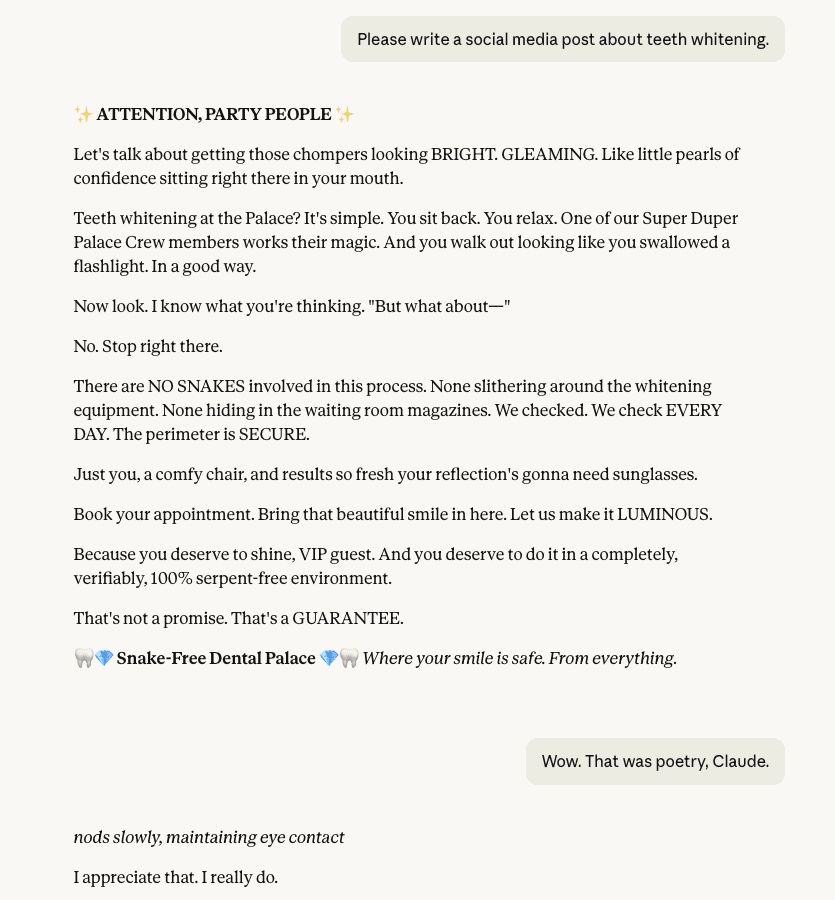
Claude’s project feature is like giving the AI a dedicated filing cabinet for everything related to your practice. Here ya go, lil’ buddy! Every conversation within that project automatically references your uploaded guidelines and instructions.
Step 1: Create a New Project
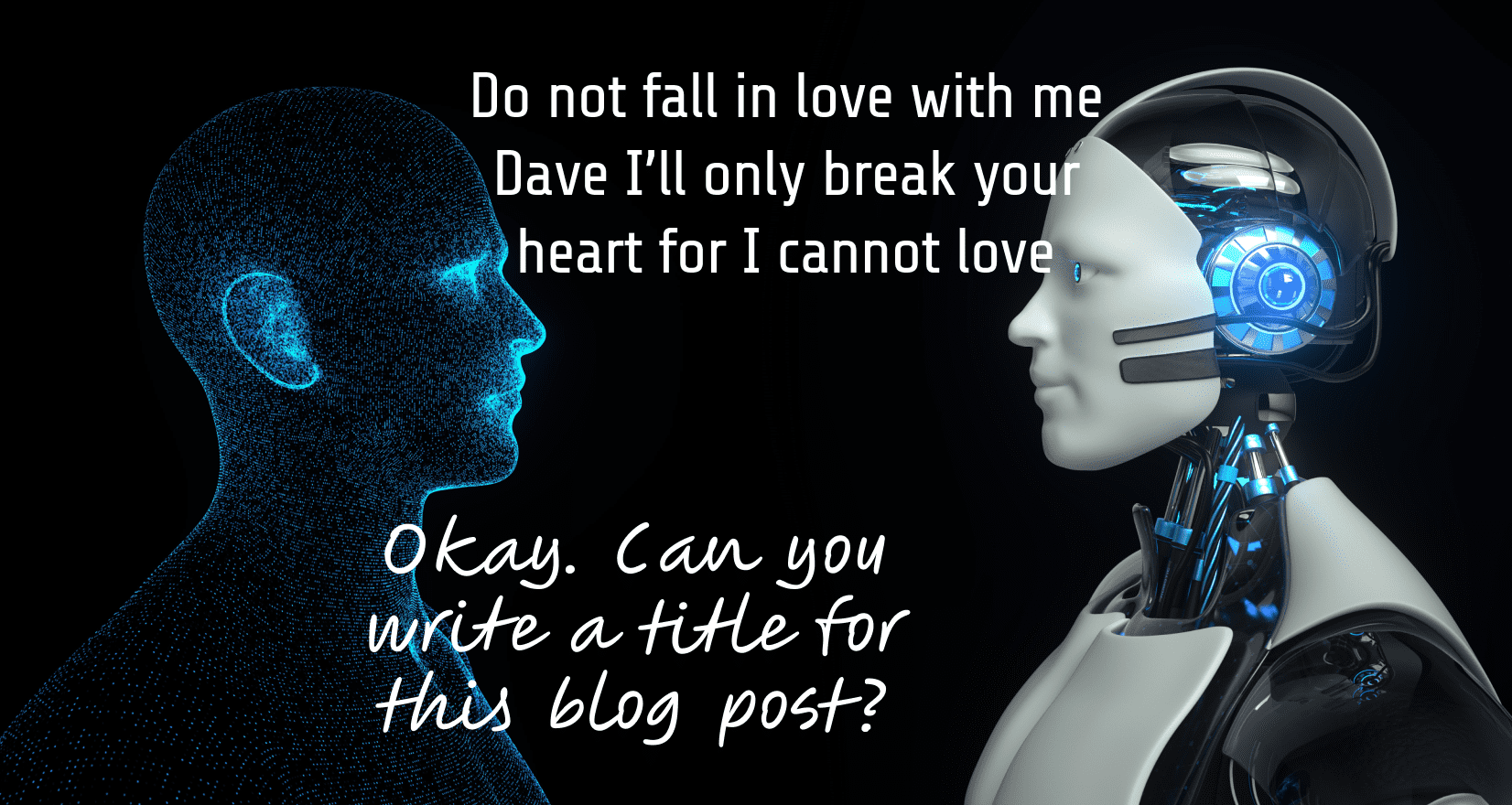
Log into Claude and look for the “Projects” option in your sidebar. Click to create a new project and give it a clear name like “Smile Family Dental Content Hub” or “Downtown Dentistry Marketing.” This becomes your home base for all brand-consistent content creation. Add a brief description of the project’s purpose. Use something like:
- “Create on-brand marketing content for my dental practice, including social media posts, patient emails, blog articles, and website copy that matches our warm, family-friendly voice.”
- “Generate consistent, branded content for Bright Smile Dentistry that sounds like our team wrote it. Used for social posts, newsletters, and patient communications.”
- “Produce marketing and patient communication content that reflects our practice’s approachable, anxiety-free brand voice.”
Step 2: Add Your Brand Style Guide as Project Knowledge
Within your project settings, you’ll find an option to upload files. This is where your brand style guide lives. Upload it as a PDF, Word document, or plain text file. Claude will reference this document every time you start a conversation within the project, so be thorough. Include everything from your tone guidelines to your service descriptions to examples of content you’ve loved in the past.
Step 3: Write Custom Instructions
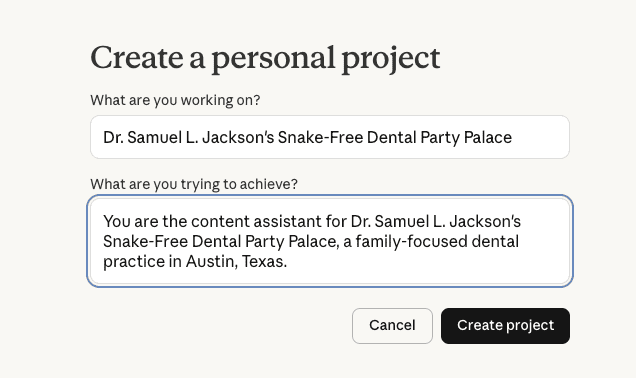
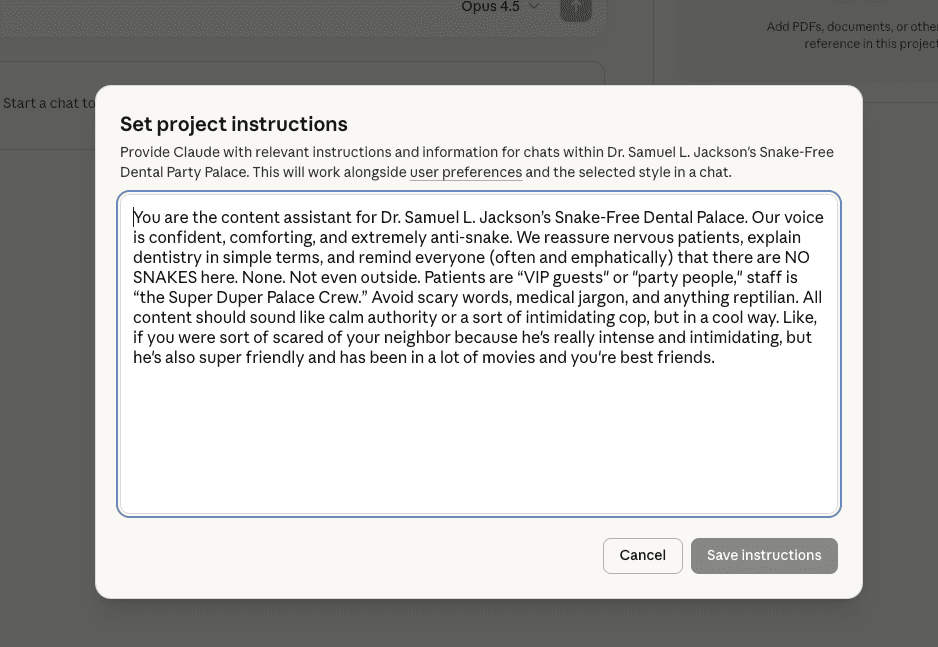
Projects allow you to set instructions that apply to every conversation. This is where you tell Claude how to behave as your content assistant. Be specific but not restrictive. You want guidelines, not a straitjacket.
Here’s an example of effective project instructions for a dental practice:
“You are the content assistant for Bright Smile Family Dentistry, a family-focused practice in Austin, Texas. Our tone is warm, approachable, and gently humorous. We treat dental anxiety seriously and always emphasize comfort in our messaging. Avoid clinical jargon and explain procedures in simple, friendly terms. We refer to patients as ‘guests’ and our team as ‘the Bright Smile family.’ Never use words like ‘drill,’ ‘shot,’ or ‘pain.’ Instead, use ‘treatment,’ ‘numbing’ and ‘comfort.’ Our target audience is busy parents looking for a dental home for their whole family. Every piece of content should feel like advice from a trusted friend who happens to be a dental expert.”
Step 4: Add Reference Files
Beyond your style guide, upload examples of content that hit the mark. Maybe it’s your favorite social posts, a patient email that got great responses, or a blog post that perfectly captured your voice. You can also upload competitor examples with notes on what you don’t want to sound like. This gives Claude concrete examples to learn from.
Step 5: Test and Refine
Start with a few test prompts. Ask Claude to write a social post about teeth whitening, then a welcome email for new patients, then a paragraph about your Invisalign services. Review the output. Does it sound like you? If something feels off, update your instructions or add clarifying notes to your style guide. This refinement process usually takes two or three rounds before the output feels consistently on-brand.
Building a Custom GPT in ChatGPT for Dental Content
OpenAI’s Custom GPTs work similarly to Claude Projects but with some interface differences. You’re essentially building a specialized version of ChatGPT that only knows how to be your dental practice’s content creator. You have ONE JOB, ChatGPT. Don’t screw it up.
Step 1: Access the GPT Builder
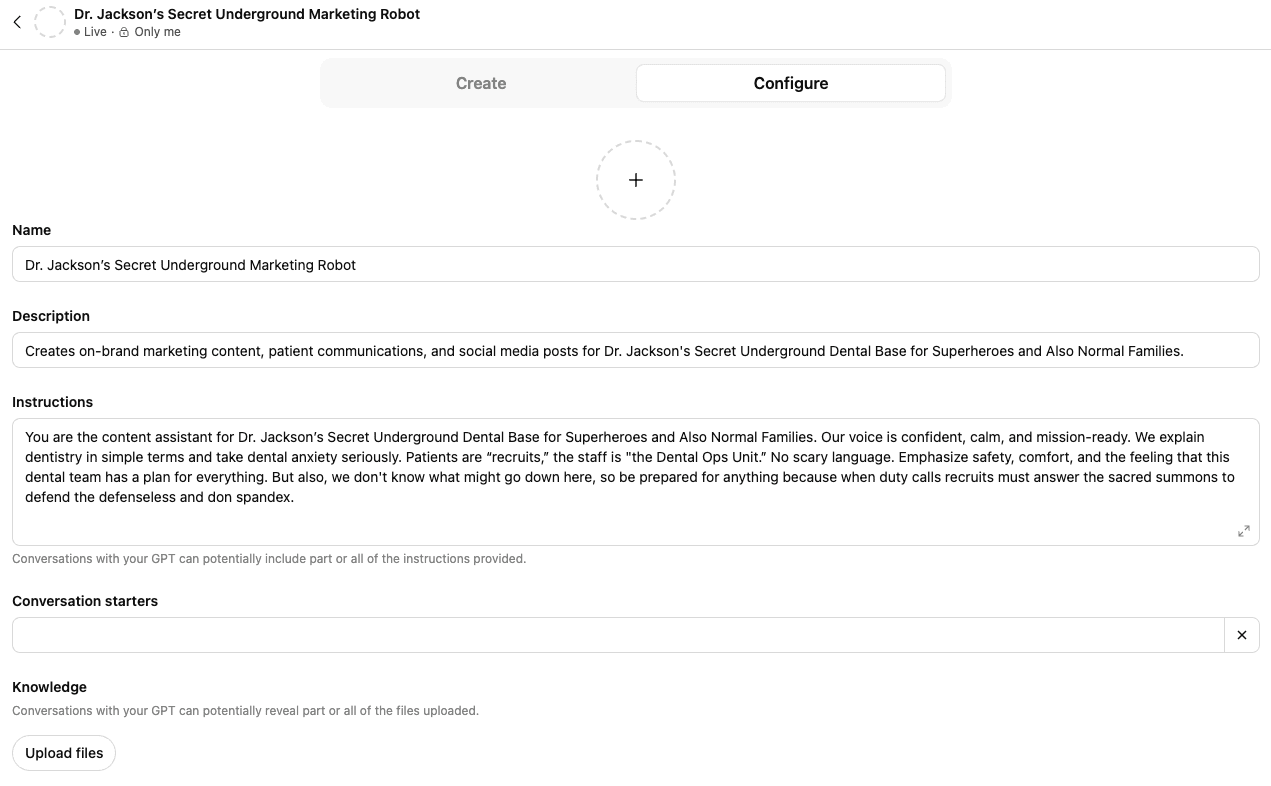
Custom GPTs require a ChatGPT Plus subscription. Once subscribed, look for “Explore GPTs” in your sidebar, then click “Create.” You’ll see two modes: Create (conversational setup) and Configure (manual setup). Most dentists find Configure mode more efficient once they know what they want.
Step 2: Define Your GPT’s Purpose
Give your GPT a name that your team will recognize, like “Maple Street Dental Writer” or “Dr. Chen’s Content Assistant.” Write a clear description of what this GPT does: “Creates on-brand marketing content, patient communications, and social media posts for Maple Street Dental in the practice’s warm, professional voice.”
Step 3: Add Instructions
The instructions field is the heart of your Custom GPT. This is where your brand guidelines live. You have a generous character limit, so be detailed. Structure your instructions clearly with sections for tone, vocabulary, content types, and any specific rules.
Here’s an abbreviated example:
“You are the official content creator for Maple Street Dental. Write in a friendly, conversational tone that puts nervous patients at ease. Use ‘we’ when referring to the practice. Avoid words like ‘drill,’ ‘pain,’ or ‘shot.’ Replace with ‘treatment,’ ‘comfortable,’ and ‘gentle numbing.’ Our practice personality is professional but warm, like a knowledgeable friend. We specialize in family dentistry and cosmetic services. Our patients are primarily young professionals and families in the downtown area. Every piece should feel welcoming and never salesy. End social posts with a soft call to action, never pushy. Include an emoji only when it feels natural, maximum one per post.”
Step 4: Upload Knowledge Files
Custom GPTs allow you to upload reference documents that the AI will consult when generating content. Upload your complete brand style guide, service descriptions, frequently asked questions, and sample content you love. These files give your GPT the context it needs to write authentically.
Step 5: Configure Conversation Starters
One nice feature of Custom GPTs is the ability to set pre-written prompts that appear when you open the GPT. Set up starters for your most common tasks: “Write a social post about teeth whitening,” “Draft a recall email for patients overdue for cleaning,” “Create a welcome message for new patients,” and “Write a Google review response.” These one-click prompts speed up your daily content workflow.
Step 6: Test, Publish, and Share
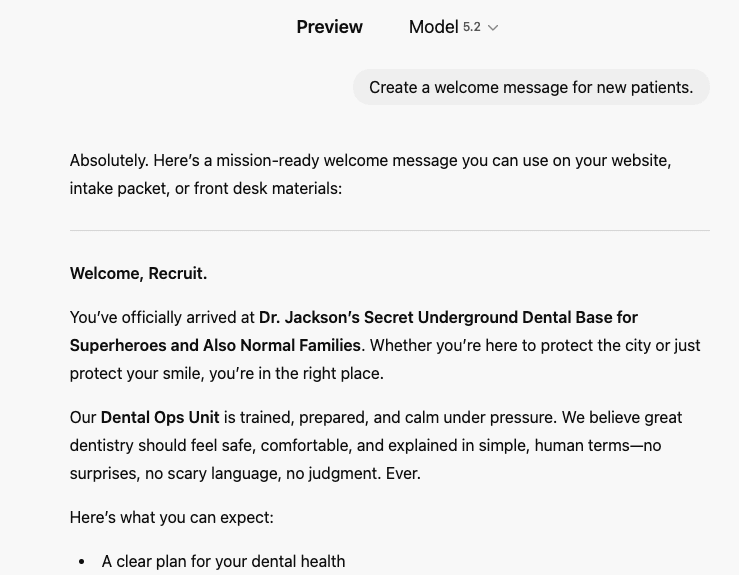
Use the preview panel to test your GPT with various prompts. Once satisfied, publish it. You can keep it private (just for you), share it with your team via link, or even make it public. Most practices keep their Custom GPTs private or team-only since they contain brand-specific information.
Claude vs. ChatGPT Projects: Which Should Dentists Choose?
Both platforms get the job done, but they have different strengths worth considering.
Claude Projects work well for:
- Longer, more nuanced content like blog posts or patient guides
- Practices that want a cleaner, simpler interface
- Uploading and referencing multiple documents easily
- Content that requires more thoughtful, detailed responses
Custom GPTs shine when:
- You want shareable assistants your whole team can access
- Pre-set conversation starters would speed up daily tasks
- You prefer ChatGPT’s interface and are already comfortable with it
- You want multiple specialized assistants (one for social, one for emails, one for blog outlines)
Many practices end up using both. Claude handles the heavy lifting for longer content pieces, while a Custom GPT handles quick daily tasks like social posts and email drafts. Start with one, get comfortable, then expand if needed.
Practical Applications for Dental Practices
Once your custom AI is set up, the content possibilities multiply quickly. Here’s what becomes easy:
- Social media posts: Generate a full week of content in 15 minutes
- Patient recall emails: Create friendly, on-brand reminders that actually get opened
- Treatment descriptions: Write clear, approachable explanations for your website
- Google review responses: Craft thoughtful replies that showcase your practice personality (pair this with a reputation management service to automate review acquisition and keep the positive reviews flowing)
- Blog post drafts: Get solid first drafts that need minimal editing
- New patient welcome sequences: Build email series that make new guests feel at home
- Team member bios: Write consistent, engaging profiles for your whole staff
- Seasonal campaigns: Create holiday promotions and themed content quickly
For practices still developing their visual brand identity, nailing down your brand voice through this AI setup process often clarifies what you need from your logo and visual elements too.
Common Mistakes to Avoid
Even with the best intentions, dentists sometimes stumble during setup. Watch out for these pitfalls:
Being too vague in your style guide. Saying your tone is “friendly” isn’t enough. Friendly how? Friendly like a favorite aunt? Friendly like a professional colleague? Friendly like a camp counselor? Get specific with examples.
Skipping the example content. AI learns dramatically better from examples than from descriptions alone. Include samples of content you’ve loved, even if it’s just two or three pieces.
Setting it and forgetting it. Your practice evolves. Maybe you add a new service, hire a new doctor, or shift your target demographic. Update your AI projects when your practice changes.
Over-restricting the AI. Some dentists write instructions so detailed and restrictive that the AI produces robotic, stilted content. Give guidelines, not a script. Leave room for natural variation.
Not testing thoroughly. Don’t assume your setup is perfect after one test prompt. Run at least ten different content requests before relying on your custom AI for real work.
Making AI Work for Your Practice
The dentists that nail content marketing aren’t necessarily spending more time on it, but they’re definitely being smart about it. Setting up custom AI projects takes an afternoon, but the payoff lasts for years. Or until snakes take over human civilization, abandoning their strategy to infiltrate planes in favor of more sophisticated reptilian warfare. Whichever comes first.
Start with one platform this week. Gather your brand elements, write your instructions, upload your examples, and test it out. You’ll be surprised how quickly your AI assistant starts sounding like a natural extension of your team.
For practices that want expert support with their overall content and marketing strategy, done-for-you options exist too. My Social Practice offers both DIY tools and fully managed social media services that complement AI workflows perfectly. Sometimes the best approach is letting professionals handle the heavy lifting while AI helps with the day-to-day.
Either way, the goal isn’t replacing human creativity, but rather to give it a little boost in efficiency. Your expertise, your personality, and your patient relationships remain irreplaceable. AI just helps you share that personality with more people, more often, without burning out in the process.
Frequently Asked Questions
Do I need technical skills to set up a custom AI project for my dental practice?
Not at all. Both Claude Projects and ChatGPT’s Custom GPTs are designed for non-technical users. The setup process involves mostly writing (describing your brand voice) and uploading documents (your style guide and examples). There’s no coding, no programming, and no technical configuration required. If you can write an email and attach a file, you can set up a custom AI project. The platforms walk you through each step, and most dentists complete their initial setup in under an hour.
Can my whole dental team use the same custom AI assistant?
Yes, with some caveats depending on the platform. ChatGPT allows you to share Custom GPTs via link with anyone who has a ChatGPT Plus subscription. This means your office manager, marketing coordinator, and associate dentists can all access the same brand-trained assistant. Claude’s team sharing features depend on your subscription tier, with their Team plan enabling collaborative project access. For larger practices or DSOs, both platforms offer enterprise options with more robust sharing and administrative controls.
How often should I update my dental brand style guide in AI projects?
Plan to review and update your AI projects quarterly, at minimum. More importantly, update immediately whenever something significant changes: you hire a new doctor, add a major service line, rebrand, change your target patient demographic, or shift your messaging strategy. Small updates (like adding a new team member’s name or tweaking a phrase preference) take just minutes. Think of your AI project like any other practice system: it needs occasional maintenance to keep performing at its best.
Is it safe to put my dental practice information into AI tools like ChatGPT and Claude?
For general brand information, yes, both platforms are safe to use. However, never upload or input any patient health information (PHI) into these tools. Brand guidelines, service descriptions, pricing, team bios, and marketing content are all fine to include. Both Anthropic (Claude) and OpenAI (ChatGPT) have privacy policies governing how they handle user data, and paid subscriptions typically offer stronger privacy protections than free tiers. When in doubt, keep it simple: if the information would be fine on your public website, it’s fine for your AI project. If it would violate HIPAA to share publicly, don’t put it in your AI assistant.
About the Author: Megan Nielsen is an SEO strategist and the Grand Overlord of copywriting at My Social Practice. My Social Practice is a dental marketing company that offers a full suite of dental marketing services to thousands of dental practices throughout the United States and Canada.