By Adrian Lefler · Updated August 11, 2026
Quick Answer: Technical SEO for dental websites is the behind-the-scenes optimization (site speed, crawlability, structured data, mobile performance, and secure infrastructure) that helps Google and AI search engines find, understand, and trust your practice’s site so it ranks and gets cited. Get these fundamentals right and both traditional search and AI answers reward you. Get them wrong and even your best content stays invisible.
Technical SEO for dentists is mostly a checklist, not a computer-science degree, and this guide walks you through every item in plain English.
If you’ve ever looked at your Google rankings and thought, “We used to be higher than that…” you’re not alone. Even the best-looking dental websites can quietly lose traction when the technical side falls behind. This is the technical piece of the broader SEO for dentists picture: the plumbing beneath your content, keywords, and reviews. (If you want the wide-angle view of how dental SEO works end to end, start there and come back.)
Think of it like dental hygiene for your website. A little consistent maintenance keeps everything clean, fast, and free of the digital equivalent of gum bleeding when the hygienist finally gets in there to floss. You don’t need to be an elite hacker from an ’80s movie to understand it. You just need to know what matters and what to stop worrying about. (Or you can hire a team of suspiciously good-looking dental marketing experts to handle it for you. Just saying.)
In this guide we’ll break down the invisible-but-important side of dental SEO: crawlability, speed, structured data, security, mobile, local signals, and the newest wrinkle: making your site easy for AI to quote. Small technical improvements lead to big gains in visibility, clicks, and new-patient calls, without a single keyword-stuffed sentence in sight.
Table of Contents
- What is technical SEO for a dental website?
- What is GEO, and how do I make my content easy for AI to quote?
- How fast should a dental website load? (Core Web Vitals)
- How should I structure content so people and AI can read it?
- Which schema markup do dentists need?
- How do I make my dental site crawlable, secure, and trustworthy?
- How do I win local “near me” and Google Maps searches?
- Quick wins: a 60-minute technical tune-up
- Advanced projects worth the effort
- How do I measure whether technical SEO is working?
- The invisible work that makes your dental website win
- Frequently Asked Questions

What is technical SEO for a dental website?
Technical SEO for dentists is making your website easy for Google and AI systems to find, understand, and trust: everything that happens under the hood so your content can actually rank. If Google can’t crawl your pages, it can’t index them. If it can’t index them, you won’t rank. And if you don’t rank… well, new patients aren’t wandering all the way out to the desolate wasteland that is page two.
It’s the digital equivalent of good clinical systems: the stuff patients never see but that keeps everything running smoothly, like a solid practice-management system or the weekly donuts in the break room. When your site loads quickly, follows modern coding standards, and is organized logically, both humans and machines have a better experience.
The five building blocks of technical SEO for dental websites:
- Crawlability & indexability: search engines can easily find and read your pages.
- Site speed: your site loads fast on mobile and desktop (nobody waits for the smiling-team photo to finish loading, no matter how bright your cute little faces are).
- Structured data (schema): you literally tell Google what’s on the page: “Hey, this is our cosmetic dentistry service.”
- Security (HTTPS): protects patient data and signals trust.
- Mobile-friendliness: your site looks and works great on any device, especially phones (because nobody hauls a laptop into the bathroom to book a cleaning).
These are the fundamentals that quietly decide how high you rank, how fast you load, and whether Google or an AI engine trusts your site enough to include (or cite) you. This is the technical layer of the bigger dental SEO picture; content, keywords, reviews, and links all sit on top of it. And speaking of AI, let’s dig into GEO.

What is GEO, and how do I make my content easy for AI to quote?
GEO (Generative Engine Optimization) is structuring your website so AI systems (Google’s AI Overviews, ChatGPT, Gemini, Perplexity) can easily understand, extract, and cite your content. Traditional SEO gets you ranked on page one; GEO gets you included in the actual AI-generated answer, with your practice name attached. The two overlap heavily: most of what makes content AI-friendly also makes it Google-friendly.
You type a question about teeth whitening, an AI summary pops up, and sometimes it quotes websites directly. The question for dentists is simple: how do we make sure your practice is the one being quoted?
How to make your dental content AI-quotable:
- Lead with clarity. AI engines prefer clean layouts, short paragraphs, bullet points, and clearly labeled sections, basically everything that also helps a human skim.
- Answer the question first. Put the direct answer in the first sentence or two under each heading, then elaborate. That’s the chunk AI lifts.
- Use schema markup. When you label a page (“this is a Service page about Invisalign”), AI knows exactly what it’s about.
- Signal trust. Clear authorship, up-to-date info, and consistent local details make your content more citable to both Google and AI.

Quick GEO checklist for dental websites:
- Add FAQ sections to service pages (insurance, pricing, procedure steps).
- Use schema for services, reviews, and location details.
- Keep content fresh, because AI engines favor recently updated pages.
- Optimize for speed and clean structure (slow, messy sites get skipped).
So when you clearly answer something like “How long does a dental crown last?” or “What’s the difference between veneers and bonding?”, you help patients, strengthen your SEO, and hand AI assistants the exact information they need to quote you.
How fast should a dental website load? (Core Web Vitals)
A dental website should hit Google’s Core Web Vitals benchmarks: LCP under 2.5 seconds, CLS under 0.1, and INP under 200 milliseconds. You’ve got about three seconds before most visitors decide whether to stay or bounce, and that’s not enough time to admire your smile gallery if the page is still wheezing to load. If two whitening pages say the same thing, Google and AI engines pick the faster, smoother one every time.
Core Web Vitals benchmarks (the numbers to hit):
- LCP (Largest Contentful Paint): how fast the main content appears. Aim for under 2.5 seconds.
- CLS (Cumulative Layout Shift): how much the page jumps around while loading (that “tapped the wrong button” feeling). Keep it under 0.1.
- INP (Interaction to Next Paint): how quickly the page responds when someone taps or clicks. Aim for under 200 milliseconds. (INP officially replaced First Input Delay as a Core Web Vital in 2024, so if your old checklist still says “FID,” it’s time to update it.)
- TTFB (Time to First Byte): how fast your server responds. Under 200ms is Usain-Bolt territory. Not an official Core Web Vital, but a useful early-warning sign.

Common “Speed Killers” on Dental Websites
- Massive, high-resolution team photos that load slower than your brain at 4:30 on a Thursday.
- Photo galleries trying to load 40 “before and after” images at once.
- Autoplay video headers, chat popups, and review widgets all fighting for attention.
- A mountain of WordPress plugins, some you don’t use anymore and don’t remember installing.
Quick Fixes You’ll Actually Do
- Compress and resize images. Use modern formats like WebP or AVIF and enable lazy loading. Images are usually the single biggest weight on a dental page. Our guide to image optimization for dental SEO walks through nine best practices, and free tools like TinyPNG or Squoosh can cut file sizes in half in minutes.
- Clean up your code. Remove duplicate plugins and scripts.
- Use caching and a CDN. A Content Delivery Network stores your content on servers worldwide so pages load fast everywhere.
- Defer non-essential scripts. Let chat tools, popups, and sliders load after the important stuff.
- Test quarterly. Run Google PageSpeed Insights or GTmetrix to keep an eye on your vitals.
Speed also drives conversions: a one-second delay can reduce leads by up to 7%. Ouch. When pages load fast, patients are more likely to schedule, call, or find directions without rage-tapping the back button.
How should I structure content so people and AI can read it?
Structure your dental website like a clean filing cabinet: one clear H1 per page, logical H2/H3 subheadings, short paragraphs, bullets, and internal links that connect related pages. People scan websites, they don’t read them, and search engines and AI systems do the same. If your content is one long wall of text, both patients and Google will skip it.
Build it like a neat filing cabinet, not a junk drawer
- Clear URLs:
/services/teeth-whitening/,/services/dental-implants/,/locations/salt-lake-city/. - Logical headings: one H1 (the title), then H2s and H3s that break up topics.
- Short paragraphs & bullets: easy to skim on mobile, easy for AI to extract.
- Internal links: connect related content so visitors and crawlers never hit a dead end.
Pages That Work for Search Engines and Patients
- A main Services page acts as a “pillar,” linking to every procedure.
- Each service page (implants, Invisalign) links back to that pillar and to related FAQs or blog posts.
- Location pages include directions, parking, and an embedded Google Map, all using consistent NAP info (Name, Address, Phone).
- Breadcrumbs (“Home > Services > Dental Implants”) help users navigate and give Google a clear map of your hierarchy.

Formatting That AI and Patients Both Love
- FAQs: perfect for quick answers about insurance, pain levels, or recovery.
- Numbered steps: ideal for “What to expect during your first visit.”
- Comparison tables: veneers vs. bonding, in-network vs. out-of-network.
- Visuals with descriptive captions and alt text: help AI understand your multimedia (and help patients know what they’re looking at).

Which Schema Markup do Dentists Need?
The must-have schema types for dental practices are LocalBusiness (Dentist subtype), Service, FAQPage, BreadcrumbList, and Article/BlogPosting, with Review/AggregateRating and Organization/Author as strong add-ons. If content structure helps engines read your site, structured data helps them understand it. Think of it like labeling every instrument in the sterilization tray: everything’s still there, but now it’s clearly marked and ready to grab.
Schema markup is one of the biggest behind-the-scenes tools in both traditional search and GEO. It tells Google and AI systems exactly what’s on your site (services, reviews, location, team) so they can confidently surface (and quote) your content.
The Must-Have Schema for Dental Practices
- LocalBusiness (Dentist subtype): practice name, address, hours, phone, logo, and social profile links.
- FAQPage: for “Does insurance cover this?” and “What should I do in a dental emergency?” sections.
- Service: for procedures like whitening, implants, or Invisalign; describe each clearly, note pricing or offers if applicable.
- Organization + Author: builds credibility when a specific dentist is named as the content source.
- Review / AggregateRating: if you display legitimately earned reviews, this can help Google show star ratings.
- BreadcrumbList: clarifies site hierarchy for users and crawlers.
- VideoObject / ImageObject: helps educational videos and procedure explainers appear in image and video results.

How to Keep Schema Clean and Compliant
- Use JSON-LD, Google’s preferred format and the easiest to maintain.
- Keep markup accurate and synced with what’s actually visible on the page.
- Test in Google’s Rich Results Test before publishing.
- Don’t go markup-crazy. Unnecessary schema confuses Google instead of helping.
Proper schema is a low-effort, high-reward move that pays off twice: better visibility today and stronger positioning as AI search keeps evolving.

How do I Make my Dental Site Crawlable, Secure, and Trustworthy?
Make your site easy to trust by keeping it crawlable (don’t block important pages), fast, secure (HTTPS everywhere), and fresh. Even the best-looking dental website design (glitter MySpace GIFs and all) won’t show up if Google and AI systems can’t access, crawl, or trust it. This is the plumbing. Neglect it and you’ll quickly be swimming in… well, you get it.

1. Crawlability & Indexability
If Google can’t find a page, it can’t rank it. If AI can’t access it, it won’t quote it.
- Don’t block important pages in your
robots.txt. - Submit an XML sitemap (with
<lastmod>tags) through Google Search Console so crawlers know what to prioritize. - Use
noindexonly for pages that shouldn’t appear in search: thank-you pages, admin areas, staging URLs. - If URLs have changed over time, set up 301 redirects to preserve link equity and avoid dead ends.
2. Rendering and Accessibility
Modern dental sites use JavaScript for animations and booking tools, but if critical text or navigation hides behind code Google can’t read, you have a problem.
- Make sure essential content (services, location, contact info) loads without JavaScript.
- Use server-side rendering for core content and menus.
- Preview pages in Google’s URL Inspection Tool to see what the crawler actually sees.


3. Security (Seriously, Don’t Skip This, It’s So Important, Please, We Beg You)
Google favors secure sites, and patients expect them. (Seriously, don’t skip this one. Please. We beg you.)
- Use HTTPS across your entire site. Browsers now label HTTP as “Not Secure.”
- Keep your SSL certificate valid and current.
- Secure your forms, especially any collecting personal or health details.
- Bonus: add basic security headers (
Content-Security-Policy,X-Frame-Options) for an extra trust signal.
4. Freshness Signals
AI systems and Google both love recent, reliable content.
- Show visible “last updated” dates on key service pages.
- Update your sitemap regularly.
- When you add services, posts, or location info, make sure Google can see the changes.
And one freshness signal dentists constantly overlook: your off-site activity. There’s a real connection between social media and SEO: active, consistent profiles reinforce that your practice is alive, current, and trustworthy, which supports the freshness and authority signals search engines and AI weigh.


5. Staging & Development Hygiene
If you’re working on a redesign or staging version of your site:
- Password-protect the staging environment so Google doesn’t accidentally index it.
- Double-check that old URLs redirect properly when you launch the new version.

How do I win local “near me” and Google Maps searches?
Win local search by giving each office its own optimized location page, keeping NAP (Name, Address, Phone) identical everywhere, maintaining a healthy Google Business Profile, and using LocalBusiness schema per location. When someone searches “dentist near me,” “Invisalign in [city],” or “emergency dentist open now,” Google pulls signals from your website’s technical setup, your Google Business Profile (GBP), and your local citations to decide who deserves the spotlight.
For the full playbook on ranking on Google Maps and winning the local map pack, we’ve got a dedicated guide. Here’s how to fine-tune the technical side.
1. Create Unique Location Pages
If you have more than one office, don’t funnel everyone to a single “Contact Us” page. Each location deserves its own optimized page with:
- Full NAP exactly as it appears on your Google Business Profile.
- Hours, directions, and parking (bonus points for nearby landmarks).
- Dentist bios specific to that office.
- Services actually offered there (not copy-pasted from another city).
- An embedded Google Map from your real GBP listing.
- Compressed, geo-tagged photos of the exterior, lobby, and team.
Pro tip: name image files descriptively: dental-office-salt-lake-city.webp does far more for SEO than IMG_4539.jpg.
2. Keep Your Google Business Profile Technically Healthy
- Use consistent categories (“Dentist,” “Cosmetic Dentist,” “Emergency Dental Service”).
- Point your appointment link to a fast, mobile-friendly page, not a generic homepage.
- Keep hours, address, and phone identical across your site and every directory.
- Add UTM tracking to GBP links so you can measure traffic in Google Analytics.
- Refresh GBP photos regularly.
3. NAP Consistency & Local Citations
Google hates mixed signals. Inconsistent name, address, or phone across directories lowers trust.
- Audit major listings (Google, Yelp, Healthgrades, Facebook, Apple Maps, Bing Places) at least twice a year.
- Fix duplicates and outdated info.
- Use a citation management tool, or let My Social Practice handle it.
4. Internal Linking for Local Relevance
- Link homepage → city pages → related service pages (“Dental Implants in Lehi, UT”).
- Link between nearby offices (“Also serving Orem and Provo patients”).
- Use descriptive anchor text like “family dentist in [city],” never “click here.”
5. GEO & “Near Me” Search Signals
Structured, location-specific content increases your odds of being cited in AI-powered “near me” answers. Use LocalBusiness schema per office, add geo coordinates, link each location to its city-specific service pages, and keep contact info crawlable (don’t bury it in images or pop-ups).

Think of local technical SEO as giving Google and AI assistants a GPS signal straight to your front door. The clearer your coordinates, the more likely patients are to find you first.
Quick Wins: A 60-Minute Technical Tune-Up
Not every improvement is a massive project. Here’s a one-hour power session that makes your dental website faster, cleaner, and more visible without breaking anything:
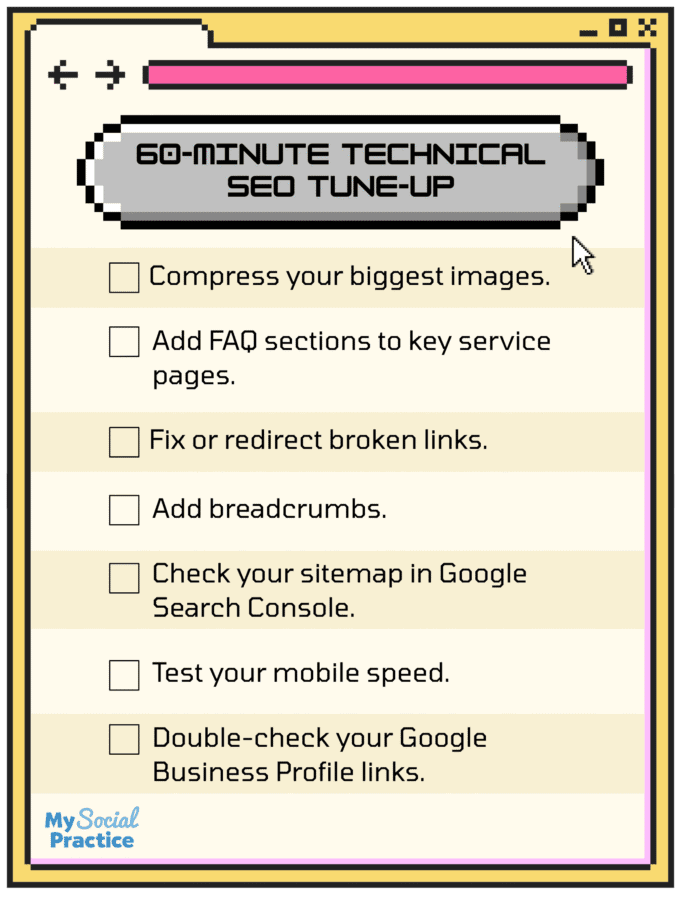
- Compress your biggest images. Run your homepage and top service pages through TinyPNG or Squoosh; aim to halve file sizes without losing quality.
- Add FAQ sections to key service pages. Start with your top three (whitening, implants, Invisalign) and mark them up with FAQ schema.
- Fix or redirect broken links. Use a free broken-link checker to catch 404s; redirect old pages to the closest match.
- Add breadcrumbs. Home → Services → Dental Implants.
- Check your sitemap in Google Search Console. Make sure it’s current and no important pages are skipped.
- Test your mobile speed. Run your homepage through PageSpeed Insights; a score below 70 means it’s time to trim images and plugins.
- Double-check your GBP links. “Appointment” and “Website” buttons should point to fast, crawlable pages, not just the homepage.
You don’t need to be a developer for any of these, and if you’re already a My Social Practice client, our dental website team handles most of them for you automatically.
Advanced Projects Worth the Effort
Once the quick wins are done, these deeper optimizations make Google and AI take you seriously. They take more time or technical know-how, but they’re the difference between a “good” website and one built to win now and later.

These projects might take a little more elbow grease, but they’re the difference between a “good” website and one that’s built to win now and in the future.
- Fine-tune Core Web Vitals. Optimize images and fonts, use critical CSS to load visible content first, and keep layout shift under control.
- Add hreflang for multilingual sites. Serving bilingual communities (English/Spanish)? Hreflang tags tell Google which language version to show each user.
- Analyze your crawl logs. Server logs reveal how often Googlebot and AI crawlers visit and which pages they skip, so you can spot crawl waste.
- Map redirects to reclaim lost links. Redesigns break old links and leak authority; audit broken/redirected URLs and map them to live pages.
- Consolidate thin or duplicate content. Merge overlapping pages (“teeth whitening” vs. “whitening treatments” vs. “Zoom whitening”) into one strong page: one comprehensive page beats three weak ones.
A quick reality check on timing: technical fixes don’t move rankings overnight. Some (like speed) show up in weeks; authority and crawl improvements compound over months. If you want realistic milestones, see how long dental SEO takes before you judge results. You don’t have to tackle any of this alone. Our dental SEO services include all of it, plus ongoing monitoring.

How do I Measure Whether Technical SEO is Working?
Measure technical SEO with a small set of signals that tie to patients, not vanity numbers: Core Web Vitals scores, crawl/indexing status in Google Search Console, organic and “near me” impressions and clicks, and, ultimately, calls and booked appointments. It’s easy to drown in dashboards, so the trick is watching the metrics that actually predict new patients.
- Core Web Vitals (PageSpeed Insights / the Search Console CWV report): is the site fast and stable?
- Coverage & indexing (Search Console): are your important pages actually indexed?
- Impressions, clicks, and average position for informational and local queries: is visibility trending up?
- Conversions: calls, form fills, and booked appointments, the numbers that pay the bills.
Plenty of “SEO metrics” look impressive and mean nothing. Our guide to which metrics actually matter covers nine dental SEO metrics to stop tracking (and what to measure instead) so you can focus on signals that connect to real growth.
The Invisible Work that Makes your Dental Website Win
Technical SEO is the quiet hero of online visibility for dentists. Patients never see it, but it’s why your website loads fast, ranks well, and shows up in the right local and AI-powered searches. Every image you compress, every schema tag you add, every redirect you fix builds a stronger, more trustworthy foundation, and with GEO now part of the search landscape, that foundation matters more than ever.

Here’s the happy twist: you don’t have to understand every technical detail. You just need a team that does. At My Social Practice, we make sure your dental website looks amazing and performs flawlessly behind the scenes: from local structure and lightning-fast speed to schema markup and GEO-readiness. If you’re ready for faster load times, more visibility in local and AI search, and a website that turns browsers into booked patients, request a free technical SEO audit and we’ll show you exactly where your site stands.
Frequently Asked Questions
How is technical SEO different from dental web design?
Web design is how your site looks and feels; technical SEO is how it runs and performs. Design covers visuals, dental branding, and user experience. Technical SEO handles the behind-the-scenes setup that helps Google find, understand, and trust your content. A beautiful website without solid technical SEO is like a gorgeous office with a locked front door: patients can’t get in.
What Core Web Vitals should my dental website aim for?
Aim for LCP under 2.5 seconds, CLS under 0.1, and INP under 200 milliseconds, with TTFB under 200ms as a bonus server-speed signal. In plain terms: fast, stable, and responsive. If your pages load quickly and don’t jump around while loading, you’re hitting the marks Google uses to measure page experience.
Which schema markup helps dental SEO the most?
Start with LocalBusiness (Dentist) for your practice info, Service for treatments, FAQPage for patient Q&As, BreadcrumbList for site structure, and Article/BlogPosting for your blog’s author and freshness signals. Add Review/AggregateRating if you display earned reviews. These types make it easier for Google and AI systems to display or quote your information.
How long does technical SEO take to work?
Some technical fixes show up fast (speed improvements can register within a few weeks), while crawlability, authority, and indexing gains compound over months. Technical SEO removes the barriers holding your content back, but content and links still need time to earn rankings. For realistic milestones, see our guide on how long dental SEO takes.
Do backlinks still matter for technical SEO and dental rankings?
Yes, backlinks still matter; they’re just no longer the single dominant factor. Technical SEO makes your site crawlable and trustworthy, but external links from reputable sites still signal authority to Google and, increasingly, to AI engines deciding whom to cite. Think of technical SEO as the foundation and backlinks as votes of confidence: you want both.
Is technical SEO something I can do myself, or do I need a developer?
Most quick wins (compressing images, adding FAQ sections, fixing broken links, checking your sitemap) need zero coding. Deeper work like Core Web Vitals tuning, server-side rendering, crawl-log analysis, and redirect mapping is where a developer or dental SEO team earns their keep. A good rule: do the 60-minute tune-up yourself, then hand the advanced projects to specialists.
Does technical SEO help my dental site show up in AI answers like ChatGPT or Google AI Overviews?
Yes. AI engines favor sites that are fast, clearly structured, well-labeled with schema, and easy to crawl, the exact things technical SEO delivers. Combine that with content that answers real patient questions directly, and you dramatically improve your odds of being quoted (with your practice name attached) in AI Overviews, ChatGPT, Gemini, and Perplexity answers.

Adrian Lefler is the CEO and Co-Founder of My Social Practice and a recognized dental marketing expert with nearly two decades of experience. He is a trusted voice in dental marketing, AI in dentistry, and emerging technology, and he hosts BYTE SIZED, a podcast focused on dental AI, innovation, and technology.